
Legal
Text Message Terms
CAISAR Team Alerts · Last updated: November 1, 2026
CAISAR Team Alerts are automated text messages from California Interagency Search & Rescue (“CAISAR”), a 501(c)(3) nonprofit, to volunteer members of search & rescue teams that use the CAISAR Team App. They are never sent to the public and are never marketing.
The Program
CAISAR runs the CAISAR Team App, a private portal and phone app that volunteer search & rescue teams use to manage callouts, training and team communication. CAISAR Team Alerts deliver a team’s urgent alerts by text to members who ask for them. Texts are sent from CAISAR’s toll-free number, (888) SAR-2370, and every message starts with CAISAR Team Alerts and names the member’s team.
How Members Opt In
Only members of a participating team can receive texts. Accounts are created by each team’s administrators; nobody can sign up for texts from outside a team. Texts are off until a member turns them on: signed in to the Team App, the member opens Settings → Notifications and turns on Text for the kinds of alerts they want. The consent statement is shown directly below the switches, with the mobile number on their profile. The date and time of consent is recorded, and the member receives one confirmation text.
Texts are optional and never a condition of membership: the same alerts also arrive through the app and by email.
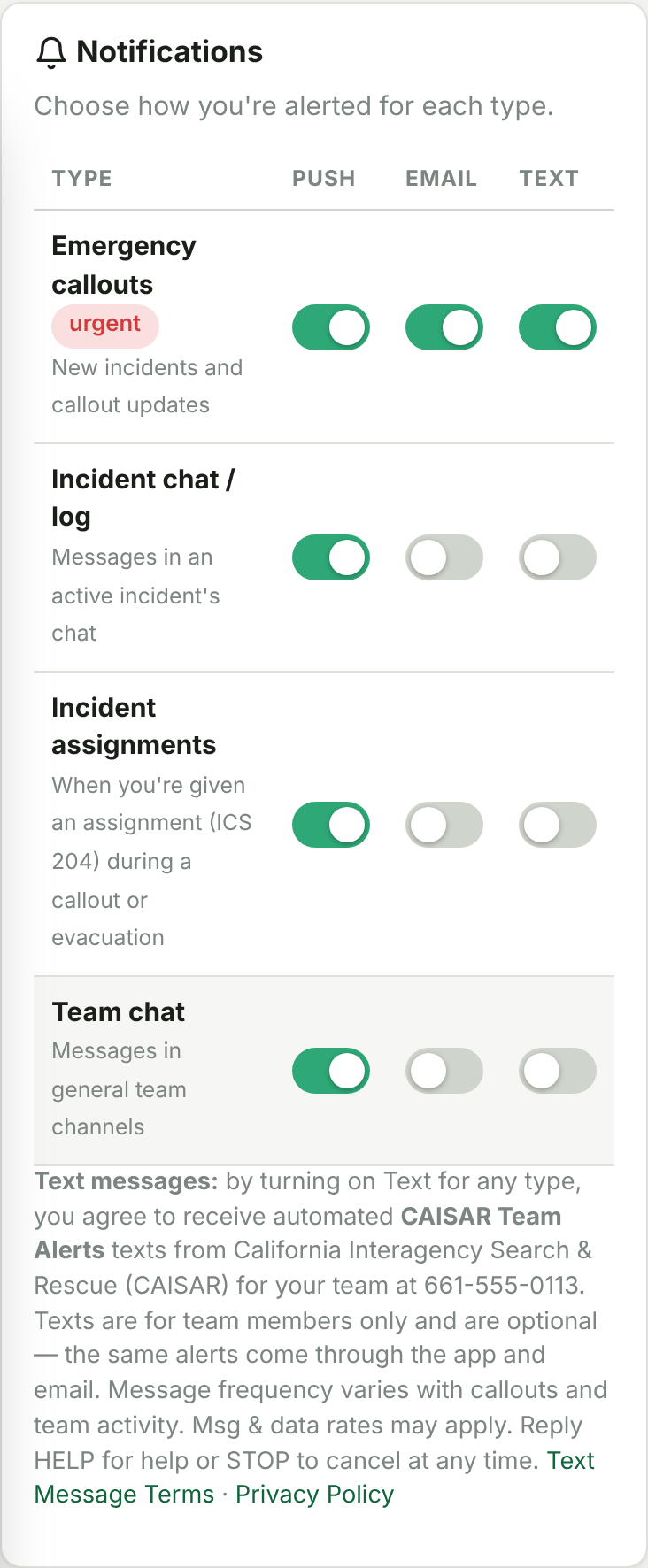
What We Send
- Callout (emergency activation) alerts and updates for the member’s team.
- Dispatch pages heard on the radio that the member chose to be alerted for.
- Team notices the member chose to receive by text, such as announcements and schedule changes.
- The one-time confirmation when texts are turned on, and replies to HELP and STOP.
Examples:
Message Frequency
Message frequency varies. Texts are recurring and depend on callouts and team activity: usually a few messages a month, and more during an active search or disaster.
Cost
CAISAR does not charge for text messages. Message and data rates may apply, depending on your mobile carrier and plan.
Opting Out and Getting Help
- Reply STOP to any message to stop all texts right away. CANCEL, END, QUIT, UNSUBSCRIBE and STOPALL also work. You will receive one confirmation and no further texts.
- You can also turn Text off at any time in the Team App under Settings → Notifications.
- To receive texts again, reply START and turn Text back on in Settings.
- Reply HELP for help, or contact us at info@caisar.org or (888) SAR-2370.
Other Terms
- Carriers are not liable for delayed or undelivered messages. Texts can be delayed or missed, so members should keep the Team App’s notifications on for callouts.
- Changing the mobile number on your profile turns texts off until you turn them on again for the new number.
- Supported on major US carriers.
- Your mobile number and consent are never shared with third parties or affiliates for marketing or promotional purposes. See the Privacy Policy.
Contact
California Interagency Search & Rescue
Email: info@caisar.org
Phone: (888) SAR-2370